Accentize dxSplit
Manufacturer: Accentize
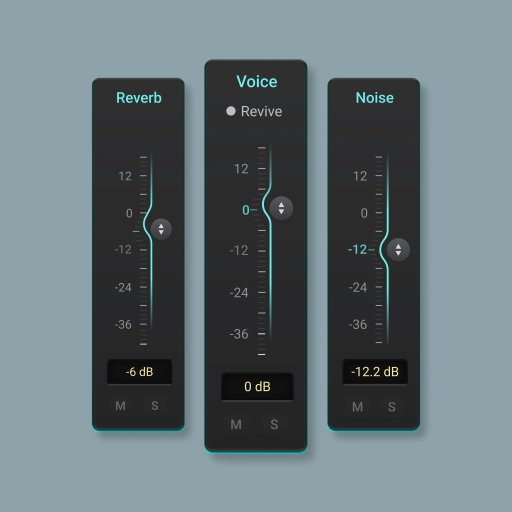
dxSplit is an intelligent audio plugin for dialogue recordings, built for post-production workflows. It automatically splits dialogue into three components, allowing you to perfectly balance Voice, Reverb and Noise.
Digital Download Purchase
£298.67
This new tool from Accentize is designed to give you unprecedented control over dialogue recordings.
dxSplit analyzes dialogue audio and separates it into three components:
• Voice
• Reverb
• Noise
Whether you're working in film, TV, or post-production, dxSplit gives you a new level of flexibility when shaping dialogue.
Key Features
• Separate dialogue into Voice, Reverb and Noise
• Adjust each component independently
• Dedicated faders and EQ controls
• Precisely control dialogue dryness and ambience
• Ideal for post-production and dialogue editing
Precise Levelling
• Use the three faders to precisely control the level of each component. For a faster workflow, you can link components to adjust them together.
• Flexible EQ Control
• Each component features its own parametric EQ for detailed tonal shaping. Adjust voice, reverb, and noise independently.
Compatible with dxRevive
Load dxRevive directly inside dxSplit and combine its filtering engine with the restoration synthesis of dxRevive for outstanding results.
The Challenge of Dialogue Processing
Dialogue recordings often contain a mix of speech, room ambience and unwanted background noise. Cleaning this up can be time-consuming and sometimes requires several different tools.
dxSplit brings modern source separation technology into a streamlined workflow designed specifically for dialogue editing and post-production. Using advanced machine-learning algorithms, dxSplit separates dialogue recordings into three components: Voice, Reverb and Noise, giving you direct control over each element of your recording.
Instead of simply suppressing noise, dxSplit lets you rebalance the dialogue, adjust room ambience, and reduce unwanted background elements with precision. Each stem features its own built-in parametric EQ, allowing you to reduce noise only in problematic frequency ranges while leaving the rest of the signal untouched. dxSplit also integrates seamlessly with dxRevive, enabling you to load the speech restoration plugin directly on the Voice stem for an efficient dialogue cleanup workflow.
How dxSplit works (in a nutshell):
Load dxSplit on your dialogue track
The plugin analyzes the incoming signal using advanced machine-learning algorithms.
Separate the recording
The audio is divided into three stems: Voice, Reverb and Noise.
Rebalance and refine
Adjust the gain of each component and shape the sound using the built-in EQ.
Enhance speech with dxRevive
Optionally load dxRevive directly inside dxSplit to restore missing frequencies and improve dialogue clarity.